, or simply deque, is an uncommon type of collection. If we search around the internet, we will find a lot of information about lists, dictionaries, and tuples, but little on deque.
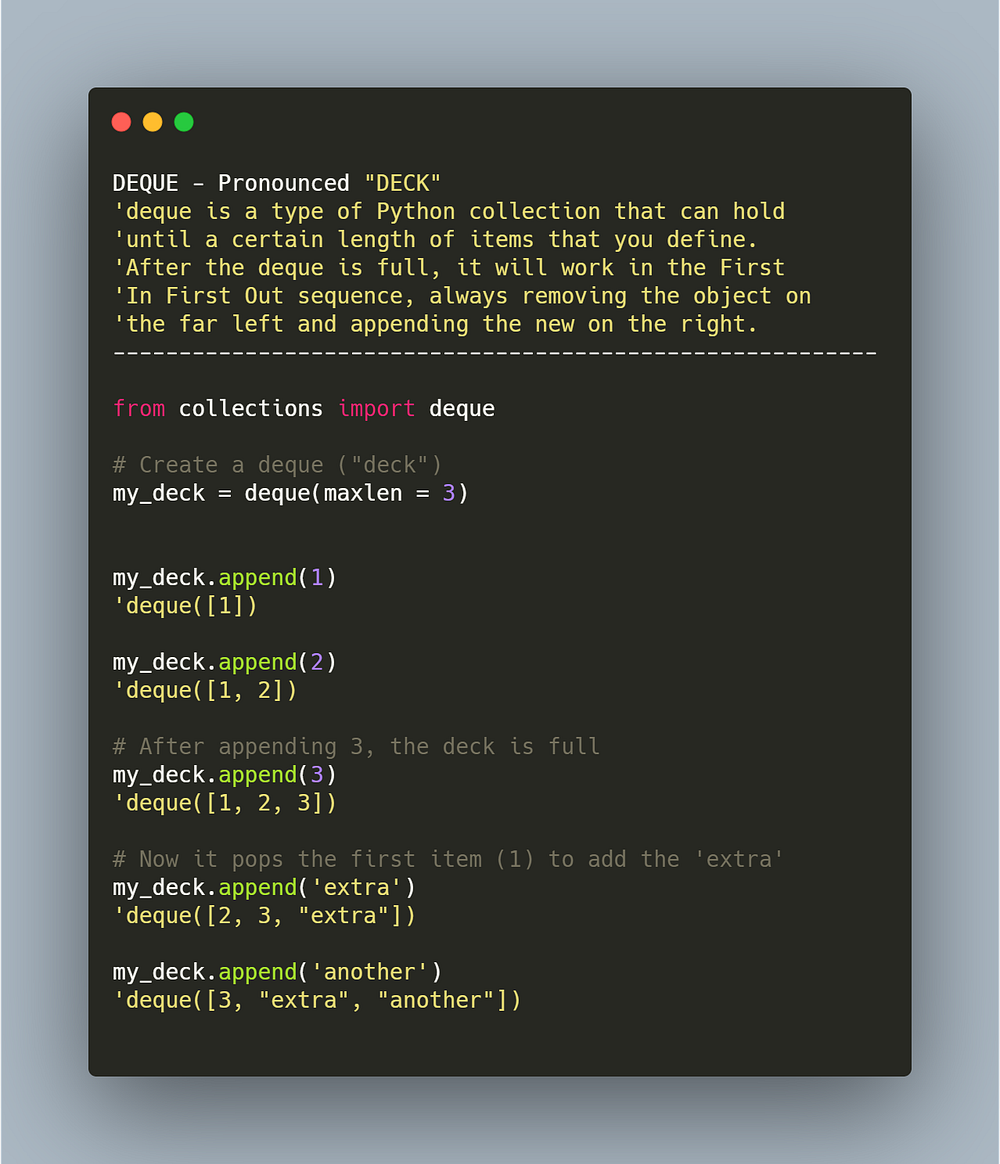
Deque (you can also pronounce it “deck” ) is an interesting and useful type of collection in Python. What makes it different than other objects is that it will hold only the number of items that you want or fewer, never more.
What the Heck is a Deck?
So it works just as a deck using the FIFO system (First In, First Out). Once the deck is full, if you append another item, it will drop the first element on the left and add the new one to the right.
Let’s see some basic examples to understand this collection. First, import it from collections: from collections import deque.
Creating a deque
Next, we will create a simple deck and add a maximum length of 3 items to it.
# Create a new deque with 3 (or less) elements
my_deck = deque(maxlen = 3)

# Adding one element
my_deck.append(1)
my_deck.append(2)
my_deck.append(3)

# View
my_deck
# deque([1, 2, 3])
Nice. Once our deck is full, observe what happens when I try to add another value to it. The first item on the left (1) gets dropped, opening space to the new item appended to the right (extra).
# It drops the first element and adds the new one at the end.
my_deck.append('extra')
deque([2, 3, 'extra'])
It works just as a deck using the FIFO system (First In, First Out).
Append Items to the Left
Now, remember that the collection is named as double-ended queue; thus, you can also append or extend elements to the left. In that case, naturally, it will drop the element on the far right.
# Append to left
my_deck.appendleft('left')
# [OUT]: deque(['left', 2, 3])

# Extend to left
my_deck.extendleft(['d', 'd'])
#[OUT]: deque(['d', 'd', 'left'])
Rotate Items
You can also rotate the elements, moving them one (or more) positions to the right or left.
# Create a new deque with 3 (or less) elements
my_deck = deque(maxlen = 3)

# Adding one element
my_deck.extend([1,2,3]) # deque([1, 2, 3])
# Rotating the elements by one position to the right
my_deck.rotate() # deque([3, 1, 2])

# Rotate to the left
my_deck.rotate(-1) # deque([1, 2, 3])
Besides the rotation, it is easy to completely reverse the deck.
# New deck
my_deck.extend([1, 2, 3])
#[OUT]: deque([1, 2, 3])

# Reverse deck
my_deck.reverse()
# [OUT]: deque([3, 2, 1])
Removing Items
In a deck, you can remove an element from the left, right, or by name.
# New deck
my_deck = deque(maxlen = 3)
my_deck.extend([1, 2, 3])
# [OUT]: deque([1, 2, 3])

# Remove item from the left
my_deck.popleft()
# [OUT]: deque([2, 3])

#---

# New deck
my_deck = deque(maxlen = 3)
my_deck.extend([1, 2, 3])
# [OUT]: deque([1, 2, 3])

# Remove item from the right
my_deck.pop()
# [OUT]: deque([1, 2])

#---

# New deck
my_deck = deque(maxlen = 3)
my_deck.extend([1, 'a', 3])
# [OUT]: deque([1, 'a', 3])

# Remove item by name
my_deck.remove('a')
# [OUT]: deque([1, 3])
You can also remove all items and clear your deck.
my_deck.clear()
#[OUT]: deque([])
Applications
1. The “Recent Search History” (Memory Management)
While lists grow indefinitely, deque has a maxlen parameter. This is perfect for features like “Recently Viewed” or “Recent Search History”, where you only want to keep the last N items without manually deleting the old ones.
# Keep only the last 3 user searches
search_history = deque(maxlen=3)

search_history.append("Python tutorials")
search_history.append("Machine Learning")
search_history.append("Data Science")
search_history.append("Deep Learning") # "Python tutorials" is automatically removed

print(list(search_history))
# Output: ['Machine Learning', 'Data Science', 'Deep Learning']
2. Live Data Stream & Moving Averages
In data science or IoT, you often need to calculate a moving average of a stream (like temperature sensors or stock prices). Using a deque allows you to maintain a “sliding window” of data efficiently.
def moving_average(stream, window_size=5):
    window = deque(maxlen=window_size)
    for val in stream:
        window.append(val)
        if len(window) == window_size:
            yield sum(window) / window_size

# Usage: Calculating average of a sensor reading stream
data_stream = [20, 21, 20, 22, 23, 25, 24]
print(list(moving_average(data_stream, window_size=3)))
3. Multithreaded Task Queues (Thread Safety)
One of the “hidden” benefits of deque in CPython is that .append() and .popleft() are thread-safe. This makes it an excellent choice for a simple producer-consumer pattern where one thread adds tasks, and another executes them.
import threading
from collections import deque

task_queue = deque()

def producer():
    for i in range(5):
        task_queue.append(f"Task {i}") # Thread-safe append

def consumer():
    while True:
        try:
            task = task_queue.popleft() # Thread-safe pop
            print(f"Processing {task}")
        except IndexError:
            break
Let’s see that in action.
# Generate Tasks
producer()
task_queue
# [OUT] deque(['Task 0', 'Task 1', 'Task 2', 'Task 3', 'Task 4'])

# Consume Tasks
consumer()
# [OUT]
# Processing Task 0
# Processing Task 1
# Processing Task 2
# Processing Task 3
# Processing Task 4

# Check Queue
task_queue
# [OUT] deque([])
Before You Go
Well, now you know another type of Python collection. You can let your creativity flow and find new ways to create your program or script.
The summary of this article is simple:
- Syntax:
deque(maxlen = n)where n is the number of elements to be stored in your deck. - It will, by default, drop the first element on the left when you add a new one to a full deck.
- The collection
dequeaccepts any type of objects, such as int, float, string, dataframe, etc. - There are many methods to manipulate it, such as
reverse,clear,rotate,appendleft.
If this content is interesting to you, read more about my work in my website.